Ransomware .PIZ via MSSQL: comparing the attack chain with CyRadar's source
Correcting attribution in the archive: separate CyRadar's MSSQL report from .PIZ, AnyDesk and Safe Mode hypotheses; retain log checklists and technical material for comparison.
Updated: · Vietnam time (UTC+7)
CyRadar's 08/09/2026 source page has been reviewed. It does not confirm .PIZ / AnyDesk / Safe Mode in the archive. Those observations remain Unconfirmed; the ATT&CK table is not confirmation that behaviors occurred.
Source record before consolidation
Original title (English translation): Ransomware .PIZ via MSSQL: from brute force to Safe Mode and encryption
Source: No.Ransomware.VN · Original date:
Original URL: https://no.ransomware.vn/tin-ransomware/ransomware-piz-mssql-cyradar-case-study/
The original is retained for comparison. The update history below records changes to sources, scope and assessments.
Source correction: do not merge two technical chains
The linked CyRadar report describes MSSQL intrusion through a highly privileged SQL account, SQL Server Agent Job persistence and PowerShell/CLR execution layers over several weeks. These are researcher findings, not reproduced by Ransomware.VN on samples.
The reviewed source does not support attribution of .PIZ, AnyDesk, Safe Mode or approximately 38,000 brute-force attempts to that report. Ransomware.VN withdraws that source attribution. The archived infographic's provenance also lacks independent corroboration.
Reading the preserved technical material
The passages below are the pre-consolidation No.Ransomware.VN analysis, relabeled for comparison. Incident-chain descriptions are unverified archive assessments. Questions about SQL logins, xp_cmdshell, CLR, remote tools and logs are investigative directions, not conclusions for a real case.
Do not run source commands or samples on production systems. Examine permissions, configurations and artifacts in authorized environments; preserve originals, timelines and evidence sources.
Archived analysis • Incident-chain descriptions not independently verified. This content is retained for comparison, not as confirmation of an incident.
The key point of this case is not the extension .piz, but the attack chain before encryption. The indicators suggest scanning, password guessing, SQL Server execution capabilities, remote-control setup and a deliberate Safe Mode boot to weaken protections before mass encryption.
sa.PIZ. Extensions may be reused by malware, variants or campaigns. Family identification needs ransom notes, file structure, markers/headers, encryptor behavior, samples, hashes, mutexes, paths, logs and infrastructure. This article therefore uses the neutral description: “ransomware using the .PIZ extension in the case published by CyRadar”.
1. Overview of the attack chain
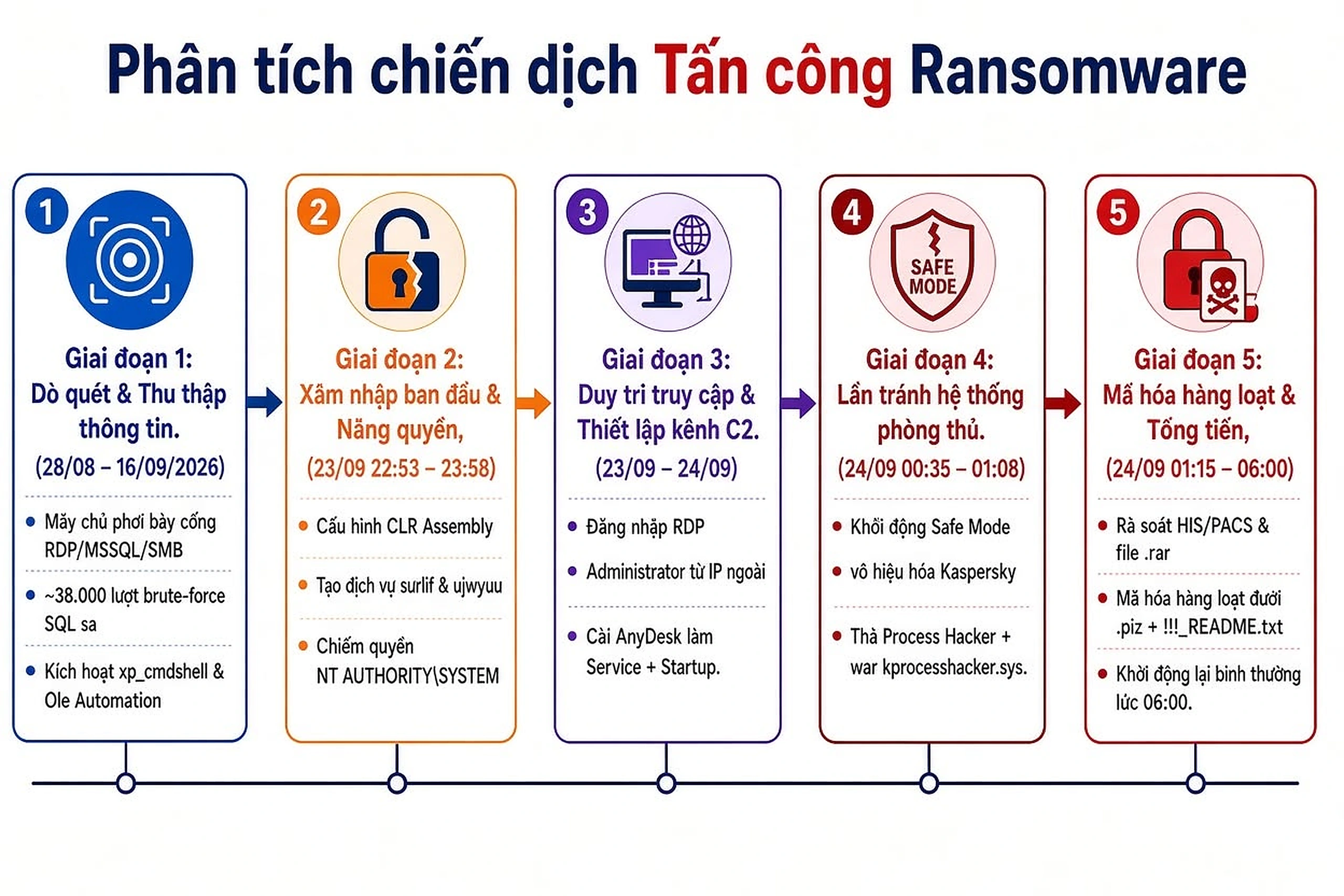
The archived infographic, attributed to CyRadar with provenance not yet checked, divides the incident into five stages. It fits a hands-on-keyboard model: interaction with the server, control of privileges, installation of access tools and environment preparation before impact, rather than immediate encryptor deployment.
Scanning & information gathering
28/08 – 16/09/2026. Management services such as RDP/MSSQL/SMB were exposed to the Internet. The old No.Ransomware.VN version reports about 38,000 SQL brute-force attempts (not independently verified) targeting account sa, with indicators related to xp_cmdshell and OLE Automation.
Initial access & privilege escalation
23/09, 22:53 – 23:58. According to the original source, the attacker configured a SQL CLR Assembly, created unusual services and obtained the privilege context NT AUTHORITY\SYSTEM. This marks a transition from SQL privileges to operating-system control.
Persistence & control channel setup
23 – 24/09. An Administrator RDP login came from an external IP, followed by AnyDesk installed as a Service and Startup entry. Abused legitimate remote-access traffic can blend with routine technical support.
Defense evasion
24/09, 00:35 – 01:08. The machine booted into Safe Mode, Kaspersky was disabled and Process Hacker/related drivers interfered with protective processes, creating a defensive gap before encryption.
Mass encryption & extortion
24/09, 01:15 – 06:00. The attacker reviewed HIS/PACS data and archives, encrypted multiple files with the extension .piz, left ransom notes in the form !!!_README.txt and rebooted into normal mode at approximately 06:00.
2. Why MSSQL matters
MSSQL underpins many ERP, HIS, accounting and business systems. The concern is deployment: Internet-exposed management ports, weak passwords, excessive privileges, OS-command execution features or highly privileged extensions.
2.1. SQL account brute force sa
MITRE ATT&CK classifies password guessing as T1110.001. MSSQL/1433 and RDP/3389 are common password-guessing targets. Tens of thousands of Internet login failures without rate limits, IP reputation, firewall allowlists or SOC alerts give attackers time to test credentials.
2.2. CLR Assembly and execution beyond the database

SQL Server's legitimate CLR Integration runs .NET code in the Database Engine. Abused with high privileges, CLR assemblies can enable execution and persistence. MITRE describes SQL stored-procedure/CLR assembly abuse under T1505.001 – SQL Stored Procedures.
Microsoft also warns that assemblies with EXTERNAL_ACCESS or UNSAFE permissions can access resources outside the database. Production requires control of signing, trusted assemblies, assembly creation privileges and CLR configuration.
2.3. xp_cmdshell must not be a permanent switch
Microsoft states that xp_cmdshell is disabled by default on new installations and should generally stay disabled unless needed. Where legacy software requires it, limit enablement duration, invocation rights and monitor configuration changes.
xp_cmdshell” is necessary but insufficient. Excessively privileged database accounts may allow other routes through SQL Agent Jobs, CLR assemblies or extensions. Defense must follow least privilege + hardening + monitoring, not just disable one feature.
3. AnyDesk: legitimate software that can become a C2 channel

AnyDesk is legitimate remote-desktop software. After intrusion, a common remote tool installed as a Service can provide durable, convenient access. MITRE ATT&CK describes this behavior under T1219.002 – Remote Desktop Software.
The defensive objective is not to ban AnyDesk at any cost, but to distinguish enterprise-approved remote tools and remote tools appearing outside procedure. A database server unexpectedly installing an AnyDesk service at midnight, connecting to unfamiliar infrastructure and then rebooting into Safe Mode is a high-priority sequence.
4. Safe Mode and disabling defenses
Ransomware operators have used Safe Mode to reduce loaded security services/drivers. The old analysis (not independently verified) reports Kaspersky disabled and Process Hacker/related drivers interfering with protective processes. In ATT&CK, this is consistent with T1562.001 – Impair Defenses: Disable or Modify Tools.
5. What the extension .PIZ can — and cannot — tell us
.piz is an observed artifact in the case, not sufficient sole evidence for family attribution.Files renamed to .piz establish one observed characteristic, but do not provide sufficient evidence to assign a ransomware family. Extensions are easily changed: operators may configure different values per victim, rebuild encryptors or reuse another group's suffix.
For more accurate identification, IR teams should collect at least:
- Original ransom notes, filenames and content.
- 1–3 pre/post-encryption files where comparison pairs exist.
- Encrypted-file headers/trailers, markers and entropy.
- Hashes of encryptors, loaders, DLLs/drivers and remote tools.
- Process tree, command line, service, scheduled task, autorun.
- IPs/domains/URLs related to RDP, AnyDesk or other C2 channels.
- $MFT, $UsnJrnl, $LogFile, Windows Event Logs and SQL logs.
6. MITRE ATT&CK mapping from public data
The table below is only behavior-level mapping of published observations, not attribution to an actor or family.
| Observed behavior | MITRE ATT&CK | Defensive relevance |
|---|---|---|
SQL account brute force sa |
T1110.001 – Password Guessing | Alert on repeated login failures; lockouts/rate limits; IP restrictions; avoid direct exposure. |
| RDP login from an external IP | T1021.001 – Remote Desktop Protocol | VPN/ZTNA, access-layer MFA, allowlists and unusual-logon monitoring. |
| CLR Assembly / SQL execution path | T1505.001 – SQL Stored Procedures | Audit assemblies, stored procedures, SQL Agent Jobs and server configuration changes. |
| Installing AnyDesk as Service/Startup | T1219.002 – Remote Desktop Software | RMM allowlists, service-creation monitoring and remote-tool outbound sessions. |
| Disabling Kaspersky / interfering with protective processes | T1562.001 – Disable or Modify Tools | EDR tamper protection; alerts for stopped or modified security services/drivers. |
| Mass data encryption | T1486 – Data Encrypted for Impact | Detect rapid file rewrite/rename, use canary files and immutable/offline backups. |
7. Signals for SIEM/EDR
Build rules around behavior preceding ransomware rather than only hunting a ransomware file. High-value signals in this case include:
A spike in login failures against
sa; success after repeated failures; CLR/xp_cmdshell/OLE Automation changes; unfamiliar assemblies or SQL Agent Jobs.New services/drivers, unusual Scheduled Tasks/Startup entries and unexpected child processes from SQL or RMM services.
Administrator RDP from unfamiliar ASNs/countries/IPs; AnyDesk/TeamViewer/RustDesk/ScreenConnect outside allowlists.
Stopped AV/EDR services, boot configuration changes, Safe Mode reboots and tamper-protection failures.
Thousands of file renames/rewrites in minutes, increased entropy, unfamiliar extensions and ransom notes.
Backup repositories mounted into production, mass deletion, retention changes and backup credentials used by compromised servers.
8. Defensive lessons — what should change?
8.1. Do not expose RDP/MSSQL directly to the Internet
This is the first priority. CISA recommends restricting or removing direct RDP. Where remote access is needed, use VPN/ZTNA, access-layer MFA, IP restrictions, session logging and separate administrator/user accounts.
8.2. Apply least privilege to SQL accounts
Business applications should not use sa or logins with sysadmin unless genuinely required. Use separate application logins with access only to required databases; prohibit assembly/SQL Agent Job creation and server changes where business functions do not require them.
8.3. Place MFA at the right layer
MFA is strategically sound but must be implemented at the appropriate layer. Traditional SQL Authentication cannot simply enable MFA for account saas Microsoft 365 can. Prioritize MFA on VPN/ZTNA, AD/Entra accounts, RDP gateways, PAM and management portals. Restrict SQL authentication and use Windows/AD authentication where appropriate.
8.4. Separate backups from production's blast radius
CISA emphasizes offline/immutable backups and regular restore tests. NAS/share/object-storage backups continually mounted with production credentials that can delete/write may be encrypted or destroyed alongside primary data.
8.5. Monitor critical configuration changes
On database servers, changes to CLR, xp_cmdshell, OLE Automation, SQL Agent, sysadmin privileges, startup procedures and service accounts require an audit trail. Send alerts to an independent system so deleting host logs cannot erase every artifact.
9. What to prioritize if a server is being encrypted
- Isolate the network immediately but avoid rushed deletion/reset operations that destroy artifacts.
- Disconnect external access: RDP, suspected VPN accounts, uncontrolled AnyDesk/RMM and unusual firewall rules.
- Preserve evidence: Event Logs, SQL Logs/Audit, Sysmon/EDR telemetry, $MFT, $UsnJrnl, useful RAM contents and encryptor/driver/ransom-note samples.
- Do not immediately restore over the infected system. Build a clean recovery environment and identify persistence first.
- Check backups in order of trust: immutable/offline → independent snapshots → copies with separate credentials → supplementary data sources.
- Identify ransomware using multiple artifacts, not just an extension.
- Prioritize critical business data such as SQL MDF/LDF, HIS/PACS and ERP before lower-priority files.
10. Conclusion
The chain described in the old No.Ransomware.VN version (not independently verified) illustrates a principle: ransomware is often the final stage, not the first stage of an incident. Focusing only on an encryptor and the extension .pizcan miss valuable artifacts: prolonged brute force, abused SQL privileges, CLR assemblies, legitimate remote tools used as C2, Safe Mode and disabled defenses.
For organizations with SQL Server, ERP/HIS/PACS or critical internal systems, reducing Internet exposure, separating privileges, hardening SQL, controlling RMM, monitoring changes and maintaining immutable/offline backups are more valuable than expecting one antivirus product to stop the entire chain.
Sources & references
- CyRadar – the post “RANSOMWARE ATTACK: LESSONS FROM A REAL INCIDENT” and the infographic supplied with the original content. Main page: https://cyradar.com/
- CyRadar — “MSSQL server attack campaign: three backdoor layers and fileless malware persisting for over six weeks”: cyradar.com/2026/09/08/...
- Microsoft Learn – Create an Assembly / SQL CLR Security: learn.microsoft.com/.../creating-an-assembly
- Microsoft Learn –
xp_cmdshellserver configuration: learn.microsoft.com/.../xp-cmdshell-server-configuration-option - MITRE ATT&CK – T1110.001 Password Guessing: attack.mitre.org/techniques/T1110/001/
- MITRE ATT&CK – T1021.001 Remote Desktop Protocol: attack.mitre.org/techniques/T1021/001/
- MITRE ATT&CK – T1505.001 SQL Stored Procedures: attack.mitre.org/techniques/T1505/001/
- MITRE ATT&CK – T1219.002 Remote Desktop Software: attack.mitre.org/techniques/T1219/002/
- MITRE ATT&CK – T1486 Data Encrypted for Impact: attack.mitre.org/techniques/T1486/
- CISA – #StopRansomware Guide: cisa.gov/stopransomware/ransomware-guide
Sources
Each source's scope and date are recorded separately when available. A citation does not independently verify every assessment.
Update history
· Correction: withdrew attribution of .PIZ / AnyDesk / Safe Mode and approximately 38,000 brute-force attempts to the linked CyRadar report. Retained the archive for comparison, labeled it Unconfirmed and added the primary source's actual scope.
· Pre-consolidation No.Ransomware.VN version; original title and timestamp retained in the source record.
Corrections policy